
Stop Doing This: The 7 Most Common Prompting Mistakes in Raspberry AI
Why good prompts are essential for great outputs.
Prompting is part art, part science - and like any craft, a few small missteps can throw off your whole result. Maybe you’ve asked for “a trendy dress” and gotten something totally different from what you pictured. Or you’ve packed so many ideas into a single prompt that the AI doesn’t know which one to prioritize. In this article, we’ll break down the most common prompting mistakes we see from designers, why they lead to off-target results, and how to fix them so you get outputs you’re excited to use.
Mistake #1: Overstuffed Prompts
- Cramming too many conflicting ideas into one.
- Your prompts can be short and sweet, or long and detailed. Be sure to check that there’s no conflicting information in your prompt.
Bad prompt
Oversized fitted cropped long jacket with minimal detailing but bold graphics, sporty yet luxury, technical but vintage-inspired, neutral colors but high contrast.
Why it fails
The prompt contains conflicting instructions (oversized and fitted, cropped and long, minimal and bold), forcing the model to guess.
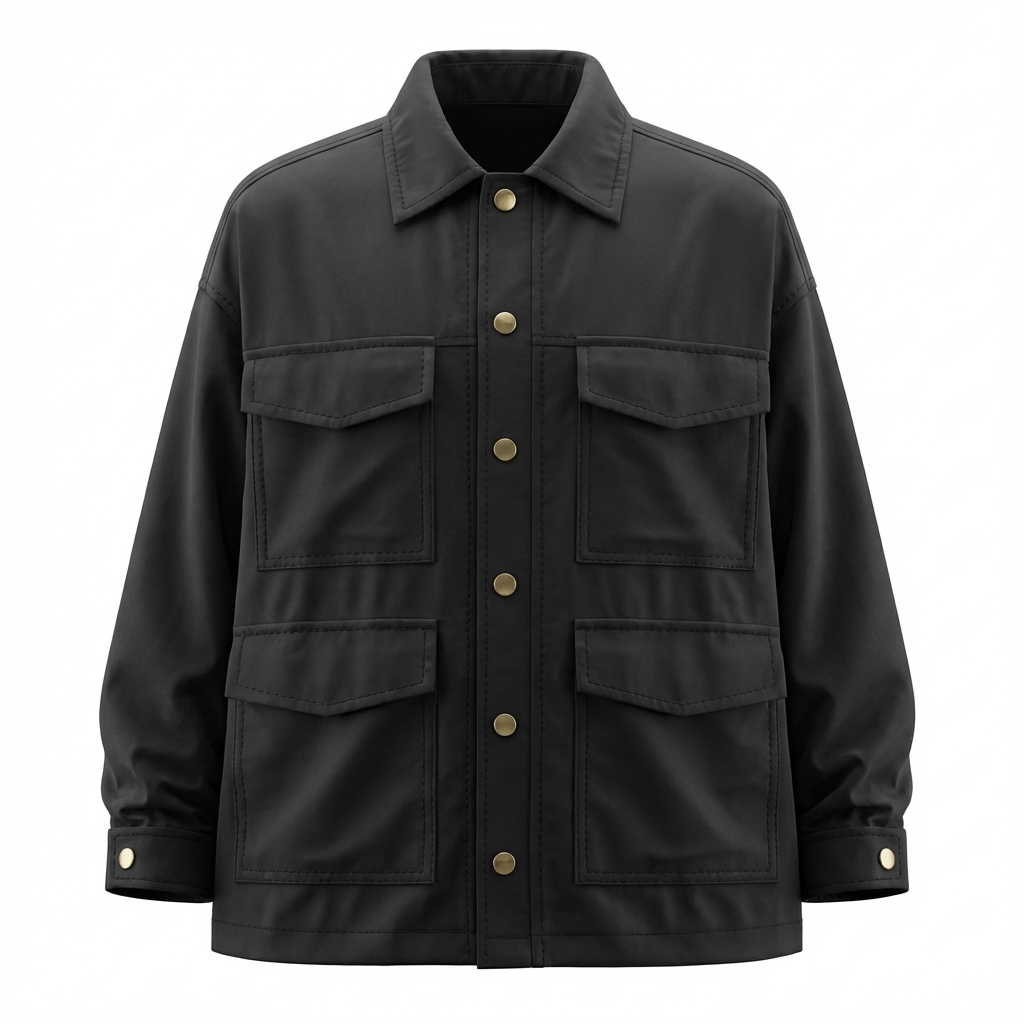
Step 1 Sketch to Render prompt
Oversized cropped utility jacket with a relaxed silhouette in black nylon.
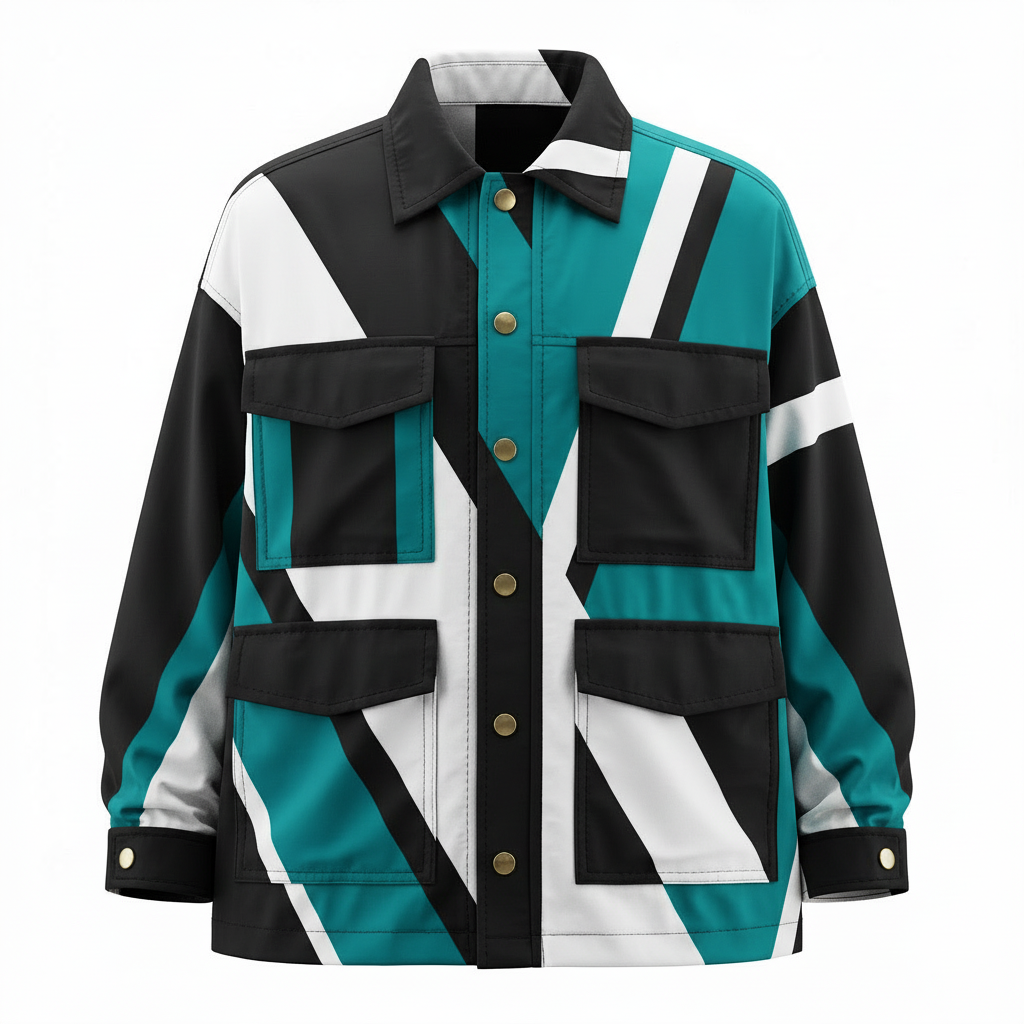
Step 2 Edit Module prompt
Initial Prompt
Add bold graphic paneling in black, white and teal with high-contrast detailing. Prompt Assist prompt: Adorn this black utility jacket with bold, high-contrast geometric graphic paneling in black, white, and teal, precisely integrated across its main body, sleeves, and collar. The paneling should feature sharp lines and shapes, creating a modern, dynamic visual while meticulously preserving the jacket's original relaxed silhouette, four flap patch pockets, structured collar, and all brass button details exactly as depicted.
Mistake #2: Vague Language
- Using terms like “cool” or “pretty” without detail.
Bad prompt
A cool, modern utility jacket.
Better prompt
Modern utility jacket with a clean silhouette and minimal detailing.
Great prompt
Oversized utility jacket with a boxy silhouette, matte olive nylon fabric, clean seam lines, and minimal brushed gold hardware.
Why this prompt is great
The prompt describes what makes the style modern: the clean seam lines and minimal hardware, without using vague terminology.
Mistake #3: Missing Key Visual Details
- Forgetting to include garment type, style, color, fabrication.
Bad prompt
Utility jacket.
Why it fails
The AI is missing critical information.

Better prompt
Oversized utility jacket in olive green nylon with large front patch pockets and a structured collar.
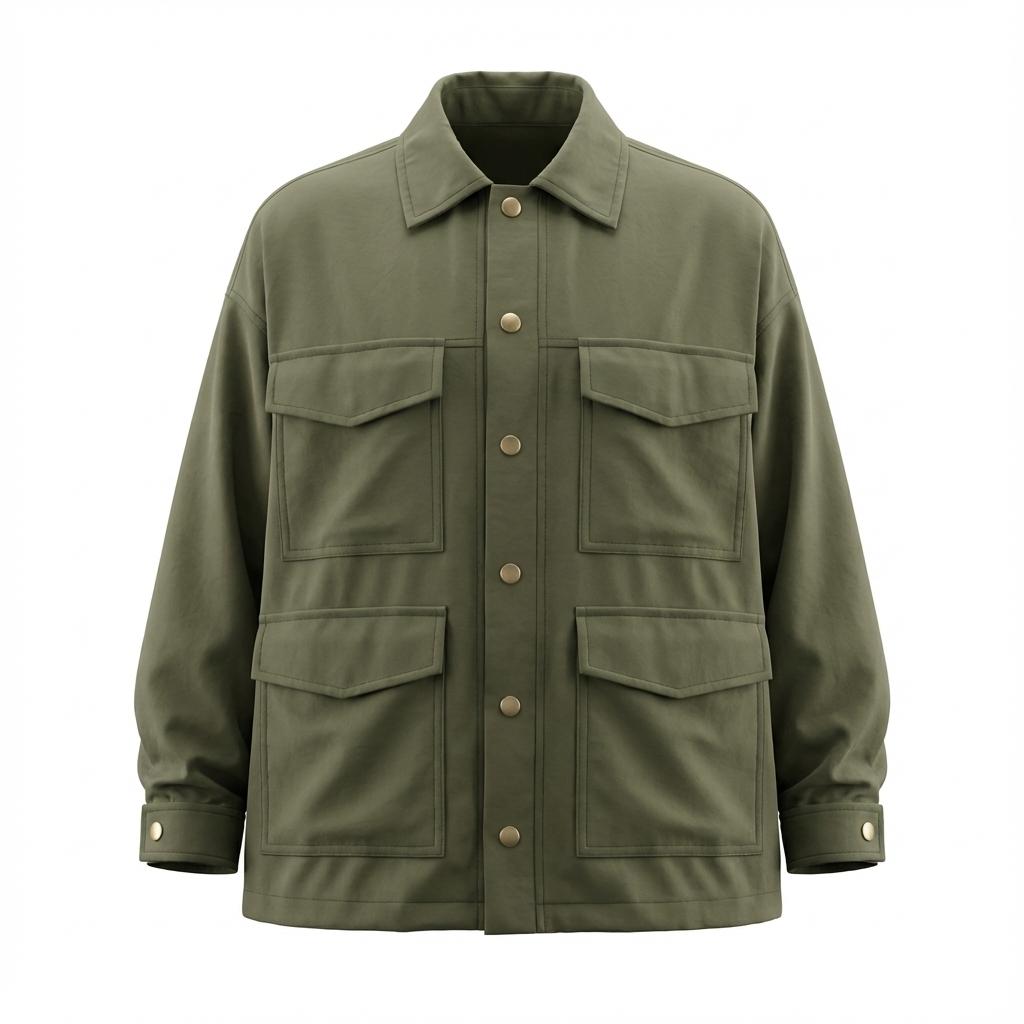
This works because it clearly defines the product, color, material, and style.
Mistake #4: Underuse of Reference Images
- Reference Images are a powerful tool to guide your outputs. Don’t rely on text only when you want a specific vibe.
- When using reference images in tools such as Lifestyle Photography and Product Photography, play around with lower Similarity Slider percentages.
Bad prompt (text only)
Oversized utility jacket with a technical, modern feel.
Better approach
- Upload a reference image of a utility jacket with the desired silhouette and pocket structure
Prompt: Oversized utility jacket with a technical, modern feel, structured pockets, and clean seam lines. - Similarity slider: 30–45%.
Mistake #5: Not Matching Terms to the Tool
- Writing On-Body prompts like Lifestyle prompts.
Bad (On-Body)
Model walking through an industrial city at sunset, cinematic lighting, editorial mood.
Why it fails
On-Body prompts should describe how the garment is worn, not the scene.
Better (On-Body)
Model wearing an oversized utility jacket unbuttoned over shirt.
- Writing Sketch to Render prompts like Edit Module prompts.
Bad (Sketch to Render)
Make this jacket oversized and boxy.
Why it fails
Sketch to Render prompts should include the garment type, style, color, fabrication.
Better (Sketch to Render)
Oversized utility jacket with a boxy silhouette, matte olive nylon fabric, clean seam lines, and minimal brushed gold hardware.
Mistake #6: Forgetting Continuity
- Inconsistent terms across chained prompts.
- Example: starting with jacket style and using coat in one of the iterative prompts, causing a longer coat style in the outputs.
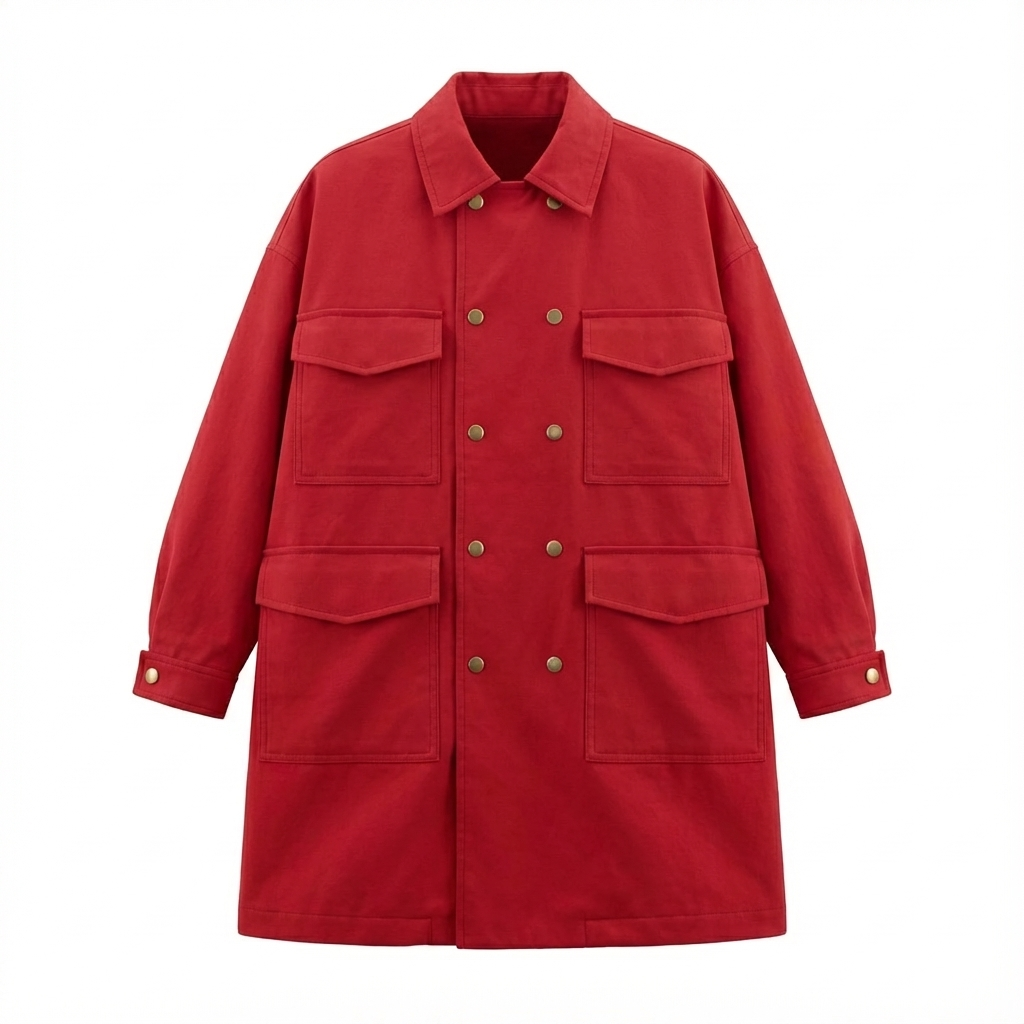
- Sketch to Render utility jacket > Apply Fabric using burgundy crocodile leather swatch > Edit Module prompt to change to double breasted coat instead of jacket, causing a longer coat style.
Initial Prompt (Sketch to Render)
Oversized utility jacket with a boxy silhouette, matte olive nylon fabric, clean seam lines, and minimal brushed gold hardware.
Incorrect Prompt (Edit AI Prompts)
Initial prompt
Change to red cotton double breasted coat style, keep all styling the same.
Prompt Assist prompt
Transform this olive green utility jacket into a vibrant red cotton double-breasted long coat, meticulously preserving its original relaxed fit, four distinct flap patch pockets, classic shirt collar, and the style of its brass-toned buttons, now integrated into the double-breasted front closure.
Corrected Prompt (Edit AI Prompts)
Initial prompt
Change to red cotton double breasted jacket, keep overall shape and styling the same.
Prompt Assist prompt
Transform the olive green utility jacket into a vibrant red cotton double-breasted jacket. Meticulously retain its exact relaxed, boxy silhouette, four large flap patch pockets, structured shirt collar, and the style of its brass-colored buttons and stitching, seamlessly integrated into the new double-breasted design.

Mistake #7: Not Reviewing Outputs Before Iterating
- Rushing into edits without checking the last result.
- Trash in, trash out - make sure every step looks great.
Pause and check:
- Is the silhouette correct?
- Are the proportions usable?
- Would I want to build on this?
Fix the base output first — then iterate.
Quick Fix Checklist
✓ Focused
One clear goal per prompt. If you’re changing multiple things, split it into steps.
✓ Clear
No vague words like cool, nice, trendy, or pretty without additional context.
✓ Specific
Product + color + material + style (don’t skip the basics).
✓ Guided
Guide the AI with references and the Similarity Slider in Lifestyle Photography, Product Images, Prints and Patterns, and Graphics and Placement Prints.
(try settings around 30–45% for variation without losing the original vibe).
Prompting well isn’t just about having the right idea - it’s about communicating that idea clearly to the AI. Avoiding the most common mistakes will save you time and frustration, helping you turn your vision into usable images faster.
Once you’ve mastered the fundamentals and dodged the pitfalls, you’ll be ready for the next step: knowing when prompting alone won’t get you across the finish line, and when it’s time to bring in the Edit Module. New article coming soon.
Heading 1
Heading 2
Heading 3
Heading 4
Heading 5
Heading 6
Lorem ipsum dolor sit amet, consectetur adipiscing elit, sed do eiusmod tempor incididunt ut labore et dolore magna aliqua. Ut enim ad minim veniam, quis nostrud exercitation ullamco laboris nisi ut aliquip ex ea commodo consequat. Duis aute irure dolor in reprehenderit in voluptate velit esse cillum dolore eu fugiat nulla pariatur.
Merchandising and design now create together live in meetings—no more weeks of back and forth.”
[[VP of Merchandising] blog-quote-ttl]
[[$30M alternative eCommerce fashion retailer] blog-quote-subttl]
Quote Name Style
Ordered list
- Item 1
- Item 2
- Item 3
Unordered list
- Item A
- Item B
- Item C
Bold text
Emphasis
Superscript
Subscript

Why 95% of AI Pilots Fail And How the Other 5% Win
Most AI pilots fail not because of the technology, but because of how organizations lead, train, and measure it. Learn the three factors that separate successful AI adoption from stalled experiments.

How to Drive AI Transformation Inside Creative Organizations
Learn the four patterns AI-forward design teams use to build real AI fluency from leadership culture and weekly rituals to embedding AI in reviews and closing the feedback loop.
%20(1)%20Large.jpeg)
Leading the AI Shift: 3 Ways Design Leaders Can Drive AI Adoption
AI adoption starts at the top. Learn how design and creative leaders can model AI use, build a culture of experimentation, and connect AI workflows to measurable business outcomes.
Sign Up for Our Newsletter
We’re constantly enhancing our product. Stay informed with the latest updates.

Ready to Design Smarter, Faster, and at Scale?
Start creating stunning photorealistic designs in just a few clicks.