Retailer Readiness Node
What it does
The Retailer Readiness node converts your brand-owned product imagery into retailer-ready assets in a single workflow — correctly sized, backgrounded, formatted, named, and ordered to match a specific retailer's requirements.
Instead of manually re-cutting the same product photo for Walmart, Amazon, Kohl's, Macy's, or NuORDER, upload one input image, choose your target retailer, and the node generates a full, compliant image set (plus optional rewritten product copy) in one pass.
Beta release: All agent generations are credit-free for the full duration of the beta. Experiment freely, push the agent hard, and don't hold back — your usage and feedback directly drives the roadmap.
Where to find it
Boards → Tools → Retailer Readiness — open a board, select an image, and choose Retailer Readiness from the Tools menu.
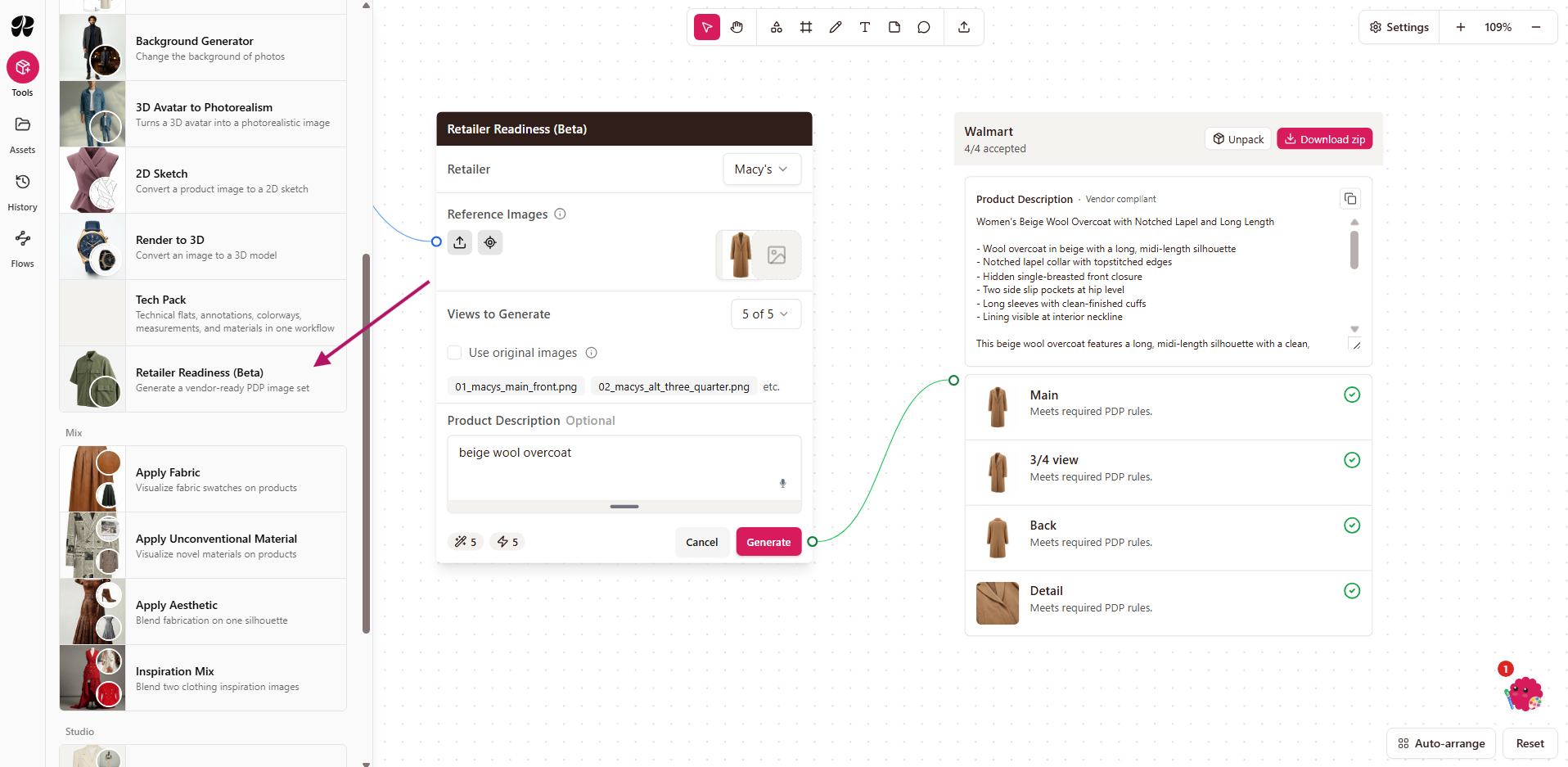
How to use it
The agent lives on your board. Open the agent panel from the board toolbar, describe the end result you're looking for in plain language, and it gets to work.
Starting Your First Task
Connect an input image. Add an input image — connect the product photo you want converted into the node.
Choose a retailer. Choose the retailer whose guidelines you want the output to follow (Walmart, Amazon, Kohl's, Macy's, or NuORDER).
Select your outputs. Pick which image views you want generated for that retailer (e.g. front, three-quarter, back, detail, lifestyle).
Add a product description (optional). If you have existing product copy, you can add it and the node will rewrite it to that retailer's title, bullet, and description format and character limits.
Decide whether to use only the original image. Choose whether the node should only use your original image as the source, rather than generating new variations.
Run the workflow. The node produces a full set of retailer-compliant images (and rewritten copy, if requested), correctly named and ordered per that retailer's rules.
Tip: if one output in the set isn't quite right, you can regenerate that individual image without rerunning the entire workflow.
Board title, Share, your profile, and canvas toolbar
Tools, Assets, History, Settings
Your workspace where you arrange nodes and run workflows
Retailer-specific behavior
Walmart — filenames follow Walmart's naming convention, and the node can generate an extended product description alongside the images.
Amazon — you can enter a product's ASIN, which the node uses when naming the output files.
NuORDER (New Order) — fewer background restrictions apply, so you can choose a light or dark background for the output images.
Supported retailers
Main, three-quarter, back, detail
1:1 — 2200×2200 recommended (1500×1500 min)
Main, three-quarter, side, back, detail, lifestyle
1:1 — 500–10,000px (1600px+ recommended)
JPEG/PNG/TIFF/GIF — 10 MB
1:1 (no strict pixel minimum)
JPEG only — 15 MB main / 10 MB alts
Main, alt three-quarter, alt side, alt back, alt detail
1:1 — 2400×2400 to 4800×4800 (still shots)
Main, three-quarter, side, back, detail, lifestyle (toggleable)
Portrait 2:3, delivered at 1400×2200
White by default, toggleable to preserve original
Why it matters
Compliance — each retailer enforces its own image spec, and getting it wrong (wrong size, wrong background, missing view) can trigger chargebacks or block a listing from going live.
Speed to market — generating a full retailer-ready image set in one pass replaces manual re-cutting and reformatting for every channel.


